We have compiled a list of manufacturers, distributors, product information, reference prices, and rankings for Support software.
ipros is IPROS GMS IPROS One of the largest technical database sites in Japan that collects information on.

Support software(work) - List of Manufacturers, Suppliers, Companies and Products

Last Updated: Aggregation Period:Dec 03, 2025~Dec 30, 2025
This ranking is based on the number of page views on our site.

Support software Product List

1~15 item / All 17 items

Displayed results

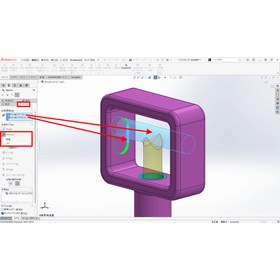
SOLIDWORKS Concept Design Tool Move Command

2D CAD-style movement command

SOLIDWORKS device design conceptual design mechanical equipment design "Move Command" that allows device design in SOLIDWORKS is a new feature developed by the SOLIDWORKS primary distributor, Argo Japan ES.

Added to bookmarks

Bookmarks list

Bookmark has been removed

Bookmarks list

You can't add any more bookmarks

By registering as a member, you can increase the number of bookmarks you can save and organize them with labels.

Free membership registration

Announcement of the partnership between OpenAI and Workato. How can AI be utilized?

An update centered around collaboration with AI! Introducing the Workato annual event report.

Workato's global annual event "Automate 2023" was held over two days on August 30-31 at the Computer History Museum in Mountain View, California. Here’s a look at the event. The theme of this event, "Discover the new way to think about AI + Automation + Integration," focuses on updates related to AI collaboration. So, how will Workato collaborate with AI, and how will this be leveraged in business? *For more details, you can view the blog through the related links. Please feel free to contact us for more information.*

Added to bookmarks

Bookmarks list

Bookmark has been removed

Bookmarks list

You can't add any more bookmarks

By registering as a member, you can increase the number of bookmarks you can save and organize them with labels.

Free membership registration

8 Benefits of Having a SOLIDWORKS Sales Agent

By making sales agents your allies, you can gain a competitive advantage!

SOLIDWORKS distributors provide ongoing support to ensure that customers can make the most of the products they purchase. Distributors are committed to supporting the training, implementation, and optimization of SOLIDWORKS design/product development solutions. This document presents eight reasons why you can utilize SOLIDWORKS more effectively with the support of a distributor. [Contents (excerpt)] ■ Focus on success ■ Direct support ■ Support that goes beyond just software ■ Customized solutions ■ One step ahead of competitors *For more details, please download the PDF or feel free to contact us.

Added to bookmarks

Bookmarks list

Bookmark has been removed

Bookmarks list

You can't add any more bookmarks

By registering as a member, you can increase the number of bookmarks you can save and organize them with labels.

Free membership registration

RCM Analysis Support Software AvailabilityWorkbench

RCM, RAMS analysis support software

The Availability Workbench is software designed to support the implementation of RCM (Reliability-Centered Maintenance) and RAMS analysis (Reliability, Availability, Maintainability, and Safety analysis). The Availability Workbench focuses on the failures of components (system systems) that make up plants and systems, using reliability engineering methods to assist with the following: - Quantitative evaluation of the availability of plants and systems - Development of maintenance plans aimed at eliminating causes of failure - Evaluation of the effectiveness of condition monitoring - Spare parts and workforce planning - Assessment of the lifecycle costs of plants and systems By using the Availability Workbench, it becomes possible to conduct Failure Mode, Effects, and Criticality Analysis (FMECA) and to predict reliability, availability, and lifecycle costs (LCC) with constraints on spare parts and other resources.

  • simulator
  • Other analyses
  • ISO-related consultant

Added to bookmarks

Bookmarks list

Bookmark has been removed

Bookmarks list

You can't add any more bookmarks

By registering as a member, you can increase the number of bookmarks you can save and organize them with labels.

Free membership registration

SOLIDWORKS Useful Features Part 7: Slot Matching / Copy Together

Contributes to streamlining assembly creation and reducing work time! It's a convenient feature related to matching.

Introducing the convenient features of SOLIDWORKS: "Slot Mate" and "Copy with Mates." By utilizing the mate-related functions, you can streamline assembly creation and reduce working time. There is an advantage in that it can be done more easily with fewer settings compared to combining with standard mates. [Features] ■ Streamlines assembly creation and reduces working time by utilizing mate-related functions. ■ Easier to do with fewer settings compared to combining with standard mates. *For more details, please download the PDF or feel free to contact us.

Added to bookmarks

Bookmarks list

Bookmark has been removed

Bookmarks list

You can't add any more bookmarks

By registering as a member, you can increase the number of bookmarks you can save and organize them with labels.

Free membership registration

SOLIDWORKS Useful Features Part 6: Contour Center / Straight Coupler Matching

Reproducing movements as intended in the design! It's a convenient feature that allows for detailed settings of relationships with other parts.

Introducing the convenient features of SOLIDWORKS: "Centerline Alignment" and "Line/Line Coupler Alignment." These features allow for precise relationships with other components, making it easier to reproduce movements as intended in the design. Additionally, they enable a more detailed expression of the designer's intent, making it easier for those other than the designer to understand the assembly. [Features] - Precise relationships with other components make it easier to reproduce movements as intended in the design. - A more detailed expression of the designer's intent facilitates understanding of the assembly for those other than the designer. *For more details, please download the PDF or feel free to contact us.

Added to bookmarks

Bookmarks list

Bookmark has been removed

Bookmarks list

You can't add any more bookmarks

By registering as a member, you can increase the number of bookmarks you can save and organize them with labels.

Free membership registration

[Case Study] Works Human Intelligence

The time required for updating corporate data has decreased from one month to almost zero! It is positioned as an essential tool for sales strategy.

We would like to introduce a case study on the implementation of "Yousonar" at Works Human Intelligence Co., Ltd. The company was taking about a month for annual corporate data updates, which led to missed opportunities and difficulties in formulating sales strategies. As a result, by assigning LBC codes, data linkage became possible not only with SFA but also with other systems, facilitating smoother information sharing with other departments. 【Case Overview】 ■Challenges - Annual corporate data updates were taking about a month, leading to missed opportunities and difficulties in formulating sales strategies. ■Effects - In addition to corporate data updates, the "Yousonar News," "Live Access," and "Story" features have contributed to improved operational efficiency and the creation of sales opportunities. *For more details, please refer to the related links or feel free to contact us.

Added to bookmarks

Bookmarks list

Bookmark has been removed

Bookmarks list

You can't add any more bookmarks

By registering as a member, you can increase the number of bookmarks you can save and organize them with labels.

Free membership registration

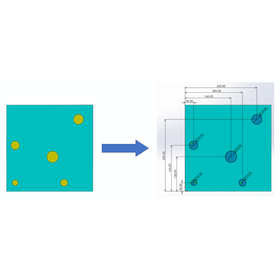
SOLIDWORKS Useful Features 2: Complete Definition of Sketches

Reduce the hassle of inputting dimensions! This convenient feature can prevent issues caused by missing definitions in advance.

Introducing the convenient feature of SOLIDWORKS, "Fully Defined Sketch." Since all dimensions are defined, it can prevent issues caused by missing definitions in advance. There is also the advantage that the dimension locations are automatically determined from the entire sketch, preventing duplicate definitions. 【Features】 ■ Reduces the effort of inputting dimensions ■ Since all dimensions are defined, it can prevent issues caused by missing definitions in advance ■ Automatically determines dimension locations from the entire sketch, preventing duplicate definitions *For more details, please download the PDF or feel free to contact us.

Added to bookmarks

Bookmarks list

Bookmark has been removed

Bookmarks list

You can't add any more bookmarks

By registering as a member, you can increase the number of bookmarks you can save and organize them with labels.

Free membership registration

Remote support software "LinkerWorks"

A dedicated service for smart glasses that improves the workplace and delivers results!

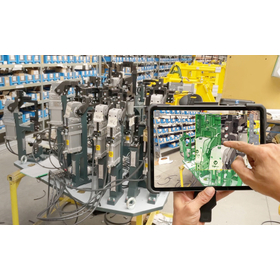
"LinkerWorks" is remote support software that realizes on-site assistance and remote presence solutions when combined with the industrial smart glasses "InfoLinker3." It connects site supervisors at the management center with workers in remote locations via the internet, enabling remote support through video calls and allowing for the storage and management of work evidence in the cloud. It includes features that enable administrators to provide precise instructions to workers in remote locations. ■ Features of "LinkerWorks" - Realizes remote support between multiple distant locations Remote precise instructions can be given to distant locations through video calls using screen sharing and drawing functions with the instructing party, and records can be captured without hindering the worker's tasks through remote operation of devices. - Assists in standardizing work and improving quality Hands-free operation through voice commands allows workers to perform tasks while confirming work procedures, and ensuring traceability through work history enhances quality and management at the work site. *For more details, please contact us through our company website.

  • Software (middle, driver, security, etc.)
  • Other services
  • Color camera

Added to bookmarks

Bookmarks list

Bookmark has been removed

Bookmarks list

You can't add any more bookmarks

By registering as a member, you can increase the number of bookmarks you can save and organize them with labels.

Free membership registration

TRIZSoft "Innovation WorkBench"

High-level TRIZ application cloud software equipped with I-TRIZ technical problem-solving tools.

Innovation WorkBench (IWB) is a comprehensive problem-solving support software for professional technical consultants and corporate development leaders. Around the world, many engineers, business professionals, consultants, educators, and students utilize IWB to skillfully solve challenging technical problems and efficiently generate high-level inventions and innovative ideas. IWB includes almost all problem-solving tools from the comprehensive creative innovation methodology I-TRIZ. Note 1: I-TRIZ is a systematic innovation creation methodology developed by Ideation International, a world-class technical consulting company, by integrating scientific creative theories such as TRIZ (Theory of Inventive Problem Solving) and VE (Value Engineering).

Added to bookmarks

Bookmarks list

Bookmark has been removed

Bookmarks list

You can't add any more bookmarks

By registering as a member, you can increase the number of bookmarks you can save and organize them with labels.

Free membership registration

CAM solution "2.5-axis machining"

Creating 2.5D CNC machining tool paths is the most powerful and easy!

The combination of the most intuitive, user-friendly interface, seamless integration with SolidWorks, and the latest tool path technology creates the most powerful and easiest way to generate 2.5D tool paths. Working with parts, assemblies, and sketch shapes to define CNC machining jobs is simple. You can quickly and visually place fixtures and components. 【Features】 - Intuitive and user-friendly interface - Seamless integration with SolidWorks, combined with the latest tool path technology, allows for fast, powerful, and easy creation of 2.5D CNC milling tool paths - Easy work with parts, assemblies, and sketch shapes to define CNC machining jobs - Quick and visual placement of fixtures and components For more information, please contact us or download the catalog.

  • Other CAM related software

Added to bookmarks

Bookmarks list

Bookmark has been removed

Bookmarks list

You can't add any more bookmarks

By registering as a member, you can increase the number of bookmarks you can save and organize them with labels.

Free membership registration

2D CAD-style movement command

Fixed parts and assemblies can be moved! It will feel similar to using 2D CAD.

The "2D CAD-style Move Command" is software that can be used in SOLIDWORKS, overcoming constraints such as the inability to match to other hierarchies or to sketches. By simply selecting points or faces on parts within an assembly and executing the command, you can move points in parallel from one to another, and if you select a face, you can move it in parallel by a specified distance. You can work without hindering the designer's thought process, such as matching to sketch circles or rotating around sketch lines. 【Features】 ■ Move points in parallel from one to another just by selecting points or faces and executing the command ■ Move in parallel by a specified distance when selecting a face ■ Can be moved even in a fixed state *For more details, please download the PDF or feel free to contact us.

  • Other CAD related software

Added to bookmarks

Bookmarks list

Bookmark has been removed

Bookmarks list

You can't add any more bookmarks

By registering as a member, you can increase the number of bookmarks you can save and organize them with labels.

Free membership registration

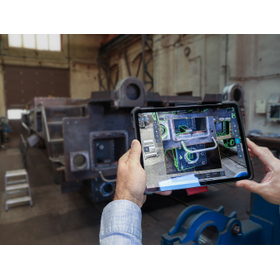
VISOMETRY Corporation AR Visual Inspection Support Software Twyn

Software that assists in the appearance inspection of large and complex shapes, also automatically generates inspection reports.

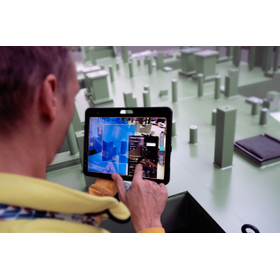
Software that displays 3D CAD data of products on an iPad and overlays it with the actual object captured by a camera, allowing for comparison and discovery of discrepancies between the data and the physical item. Discovered discrepancies can be recorded in terms of location and condition through freehand drawing, and a photo report can be automatically generated. Key inspection points and areas that require special attention can be set in advance, and by displaying caution instructions on the screen, work time can be reduced. Until now, even visual inspections that required skilled labor can be performed with high accuracy with only minimal training. Typical applications: ✓ Large sheet metal parts ✓ Canned structures ✓ Large jigs - Used for inspections during processes, before shipment, and upon receipt. It helps to identify mistakes arising from forgotten part installations, processing omissions, positional differences, and mix-ups of drawing versions, thereby improving the accuracy of visual inspections and promoting labor-saving measures.

  • 2021-02_SVK_Costumer_Slavia Productions_Jig and Fixture.jpg
  • 2023-10_CSZ_Customer_Loko_IMG-4973.jpg
  • 2024-01_SVK_Customer_SlaviaProductions_DSCF0082.jpg
  • Image Processing Software

Added to bookmarks

Bookmarks list

Bookmark has been removed

Bookmarks list

You can't add any more bookmarks

By registering as a member, you can increase the number of bookmarks you can save and organize them with labels.

Free membership registration

10 Best Practices for Design Collaboration

By making data management more accessible, organizations can improve the efficiency and accessibility of the design process!

Effective design collaboration is essential for the success of various engineering projects. To support the needs of more users, companies must solve common data management issues without requiring large-scale infrastructure. This eBook discusses 10 best practices for design collaboration that simplifies and enhances design workflows using SOLIDWORKS cloud service tools. [Contents (excerpt)] - CAD-compatible cloud storage systems - Secure shared markup - From documents to conversational format - Automatic revision management - Efficient task assignment and management *For more details, please download the PDF or feel free to contact us.

Added to bookmarks

Bookmarks list

Bookmark has been removed

Bookmarks list

You can't add any more bookmarks

By registering as a member, you can increase the number of bookmarks you can save and organize them with labels.

Free membership registration

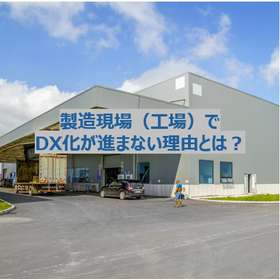
What are the reasons why DX (Digital Transformation) is not progressing in manufacturing sites (factories)?

The importance of DX is understood. However, why is it still not progressing well in manufacturing sites (factories)? Here are some representative reasons.

In recent years, the importance of DX (Digital Transformation) has been emphasized, but the reality is that progress is slow in the manufacturing sector. Particularly in small and medium-sized enterprises, there are many cases where implementation lags behind that of large corporations. The reasons for this can be summarized into three main points: 1. Lack of personnel capable of promoting DX There are often no personnel on-site who understand IT or digital technologies, making it difficult to promote DX. 2. Strong resistance to change There is anxiety and resistance to changing long-established ways of doing business, and the mindset of "the current situation is sufficient" hinders reform. 3. Overemphasis on return on investment If decisions are made solely from the perspective of "will results come immediately?", DX will not progress. A lack of a medium- to long-term perspective poses a risk of losing competitiveness. As the aging population and declining birthrate continue, can we survive without DX? Why not start with what is within reach? ▼ Please also check out the short video. (1 minute) https://www.youtube.com/shorts/IYCtZzeReIw

Added to bookmarks

Bookmarks list

Bookmark has been removed

Bookmarks list

You can't add any more bookmarks

By registering as a member, you can increase the number of bookmarks you can save and organize them with labels.

Free membership registration